Sunday, 6 March 2016

TestBash 2016 Preview

Cc4ejX5XEAAqazB.jpg large.jpg

Introduction

I’ve been lucky enough to be able to head down to TestBash this year, only 9 months after I started learning there was a software testing community out there! So here I am in Brighton, typing this post to collect my thoughts before the week ahead!

What’s TestBash?

TestBash is one of the biggest software testing conferences in the UK and is organised by the Ministry of Testing. It attracts testers from all over and has featured many prominent speakers especially from the context-driven testing community such as James Bach and Michael Bolton. You can watch many of the great talks on various testing subjects from years gone by on the Ministry of Testing’s training area, The Dojo.
As well as the 1-day conference, there are also several workshops and training courses in the week building up to it.

My Itinerary

I’ve been very fortunate with help from both work and Rosie Sherry at the Ministry of Testing to sign up for both a 3-day training course on Rapid Software Testing (RST) with Michael Bolton and for the 1-day TestBash main conference. So my week ahead looks like this:
Monday - Wednesday
Rapid Software Testing training course
Wednesday and Thursday nights
Pre-TestBash meetups around Brighton
Friday
TestBash main conference + evening meetup
Saturday
Morning post-TestBash meetup

Preview thoughts

I’m very excited to take the RST course with Michael Bolton and I’m very much looking forward to being challenged in my way of thinking. I hope to learn a lot from it and meet some like-minded testers on the course! I’ve read and heard a lot about the ominous sounding 'dice game' which I’m sure I’ll be playing at work when I get back. I’m expecting to find a lot of themes that I recognise but have never really thought about before and to find new methods, skills and thoughts. Technically this is the first time I’ve really been trained as a tester!

I’m also very much looking forward to the various meetups and getting a chance to make some new friends, talk testing and share ideas! I’m looking forward to the chance to be able to chat with several prominent testers, who I have a lot of respect for. I’m also looking forward to seeing some familiar faces who I’ve met before either from previous workplaces or from the meetups I’ve been to recently.

Finally, I’m definitely excited to attend the main conference on Friday, there are lots of great talks that I’m looking forward to such as 'Building the Right Thing: How Testers Can Help' by Lisa Crispin and Emma Armstrong and 'A Pairing Experiment' by Katrina Clokie which really touch on subjects that I’m currently active in.

Plan

Ok so I’m going to try and keep this blog updated each day of the week in Brighton with my thoughts and experiences from each day. I like doing this because it helps collect my thoughts and I’m keen to share my experience with others so that you might be encouraged to go to your local testing meetups and conferences too!
I hope by the end of this week that I have learnt a great deal and made many new friends. I’m looking forward to sharing the learnings and knowledge I gain from this week for many years to come both at work and at meetups!

Friday, 12 February 2016

North West Tester Gathering

Introduction

In the last few weeks I’ve attended my first ever testing meetups in Manchester and Liverpool. Both of these meetups were organised by a group called the “North West Tester Gathering” and you can find it here on meetup.com. Other than online, I’ve never spoken to any testers outside of the companies I’ve worked for and I was really looking forward to it. I wanted to go for two reasons:
  • To listen to other testers’ experiences and try to learn from them, the problems they faced and the solutions they chose.
  • To talk about my own experiences and seek out fresh opinions and ideas and talk about the challenges I face. This is not necessarily because I don’t believe I can face the challenges alone, but because I believe I can never think of everything and I like to try out new ideas that I might never think of.

Speakers

For the first meetup in Manchester there was only one main speaker, Richard Bishop from a company called Trust IV - a software testing consultancy company. The main topic of the talk was about Network Virtualisation, which is a technology that allows you to “stub” or simulate network interactions such as a user visiting to your website through an iPhone on a 2G network. The tool they demonstrated this with was one created by Hewlett Packard called HPE Network Virtualisation.
The second meetup in Liverpool had two speakers, Vernon Richards and Duncan Nisbet. Vernon’s talk was about the common myths in testing that we all know and how we can tackle these myths - mainly by improving how we talk about testing in the first place! Duncan’s talk was about exploratory testing and how we probably all already conduct exploratory testing, we just don’t include it in our existing processes.


You can find videos of these talks here:
“Myth Deep Dive” by Vernon Richards:
“Exploratory Testing” by Duncan Nisbet:
{will add when its uploaded!}


Main Takeaways

I found all of the talks engaging and very relatable! I fully recommend watching the videos if you’re new to discussing the world of testing!
“Network Virtualisation” by Richard Bishop
  • Richard showed us some figures produced by one of the large big data companies forecasting how the technology market would look for 2016. In it, he especially highlighted the rise of end users relying on mobile devices to interact with products. I think this was useful food for thought especially as I’m involved with a project which could be viewed via mobile.
  • He also used some very effective examples of demonstrating the value of performance testing as well as the need to validate your assumptions (which applies to any testing!). He described an interesting test where they took network speed samples before and during a major football match and found that the speed was faster during the match - against their assumption that it would be slower!
  • I’ve definitely got a lot to learn still regarding performance testing, right now it feels like a domain rich with specialist knowledge (or at least different knowledge, for example the need to understand and know about statistical significance). I now know what the phrase “jitter” means! (where network packets are received in the wrong order).
  • Richard also provided some useful example use cases such as Facebook’s “2G Tuesdays”. This is where employees at Facebook are asked to work with Facebook using a network speed as slow as 2G to help them understand the difference in experience for some users in more remote or developing areas of the world. I felt this was an effective example of the lengths Facebook were going to, to try and help their employees empathise with these customers and therefore take their product’s performance on slow networks seriously.
“Myth Deep Dive” by Vernon Richards
  • Vernon’s talk mainly focused around talking better about testing to non-testers. A lot of myths people believe about testing are partly caused by our own inability to talk about testing.
  • There were a lot of themes that I think we would all recognise, such as “The way to control testing is to count things” - which is to say, judging the value of testing in terms of test cases executed or bugs reported and how this isn’t necessarily useful.
  • I really recommend you watch the video above! But the other themes were: "Testing is just clicking a few buttons" and "Automated testing solves all your problems".
“Exploratory Testing” by Duncan Nisbet
  • Duncan’s talk focused on some typical testing examples of where we all perform exploratory testing but simply don’t think about it being exploratory - we don’t value it because we don’t identify it.
  • He also talked about exploratory sessions being iterative, you spend time exploring, learn what you can and then repeat but designing further tests based on what you’ve learnt.
  • He also talked about the difference between good and bad exploratory testing being how well the tester can explain what they did in an exploratory session. Good exploratory testing can be explained and justified, it isn’t random and a tester should be able to easily explain what they were doing and why.

Socialising!

So other than the main talks, I was attending these meetups to meet and talk to other testers! I introduced myself to a few people and got chatting to quite a few different people. Some people I already knew from my days at Sony in Liverpool, others I met for the first time. It was nice to be able share stories and experiences, I highly recommend attending meetups just for this really, you can learn a lot from others and get some different points of view on your testing ideas.

Being brave…

At the Manchester meetup I caught up with Leigh Rathbone, who was organising the Liverpool meetup. During the course of our chat, I think my passion for testing got out and Leigh asked if I wanted to stand up and do a lightning talk at Liverpool. I don’t take opportunities like this lightly, so I accepted. I think the process of writing these blog posts has helped prepare me a little bit but I certainly have never stood up in front of 80 people, let alone people from my profession, some of whom are massively more experienced than me and whom I have a lot of respect for.
I chose to talk about the very subject that I passionately discussed with Leigh - diagrams. Lately in my recent work I’ve found many examples where people try to explain themselves in terms of words - either written or oral and failed. Not everything is easy to explain this way - I have definitely found that right here on this blog! The point I tried to make was that sometimes some information is better explained in a diagram or chart - e.g. timelines, flowcharts, mind maps and entity relationship diagrams to name a few. Its worth considering this when we are trying to explain ourselves or when someone is struggling to explain something to us. I explored this theme a little in my post Test Cases - do we need them?
I also quickly recommended a book that I believe every tester should read -  “Perfect Software and other illusions about Testing” by Gerald Weinberg. I had never read a testing book before and I’m fairly sure a lot of testers haven’t. I particularly like this book because I think it addresses the very topic Vernon was talking about - explaining what we do as testers in terms that anyone can understand. I’m also very much a fan of Jerry’s writing style, his stories and anecdotes make his points so much more memorable and relatable!

Summary


  • You should attend testing meetups! Even if you’re not a tester!
  • Even if I knew something already about the topics discussed, I always had something to learn or a new way of looking at it. I’d like to think I will always learn from the talks at these meetups.
  • Richard, Vernon and Duncan are really friendly and engaging people to talk to!
  • I shouldn’t be afraid of talking in front of lots of testers, because they are friendly people and I must have made some kind of sense as people came to thank me and chat about diagrams! I hope this inspires other people are nervous or unsure of talking to give it a go! Don’t listen to your brain!
  • Take opportunities with both hands when you see them - it can be very rewarding!
  • I’ve only attended two meetups so far and I’ve got so much to talk and think about!

Wednesday, 20 January 2016

Test Cases - do we need them?

Introduction

I’ve worked in three different companies now as a tester and I’ve read, written and executed a lot of different types and styles of test case. My time especially at a large corporation working with large numbers of test cases written by a large number of different people really gave me some varied experience with them.
Not only that, but these three companies had different approaches to their processes and testing reflected that. I’ve worked with gigantic test suites of thousands of test cases, projects where the test cases were a single spreadsheet and projects where I tested with no test cases at all.
Which then begs the question, do we need test cases? Is there such a thing as too many? Or are there not enough test cases?

The realisation

I once asked my testing team this question - what do you find test cases useful for? Some of the answers I got back were something like this:

“To make sure we check everything”
“To work out what to test”
“To help us learn other areas of the system we haven’t tested before”
“To have confidence we have tested everything and not forgotten anything”

There’s a common theme here, the realisation that test cases are just a form of documentation. Documentation of what you are testing and the kinds of tests you want to run. Not only that, but as testers we use test cases to assist us in learning the system and designing our tests. In other words, we write out test cases in order to figure out what tests we want to run.

So if we’re not even designing our tests before we write them, then how can we hope to write them to a good standard? Are we even thinking about writing them to a standard? Can all tests fit any particular standard?

By having this documentation and putting a tick next to each test, testers also find confidence that they have thoroughly tested the system. So if test cases are a form of documentation….

Do we need documentation?

I think any tester would answer this with a yes. Without documentation, you are wholly reliant on memory and what people tell you. Documentation almost always exists somewhere - even if it’s not “formal” documentation (e.g. a written document, diagram or perhaps a wiki), it might be just an email, a set of requirements or your notes observing the behaviour of the system. Technically, the code of a program is the ultimate form of documentation - it’s just it might not be very easy to read! Documentation is a way of articulating information in a more easily understandable way, and as testers we want to understand as much as possible about the system we are testing. So having easily understandable documentation is very valuable to us.

So, we’ve established we do need documentation, and we’ve established that test cases are only one form of documentation. Maybe then the question to ask is…

Are test cases always the right kind of documentation?

Documentation is a way of articulating information, so the way we produce documentation influences how well people understand it. There is also a cost to documentation, it can never be done in zero time and it takes skill to create documentation that is well written and understandable to a given audience.
Just as there are good authors and bad authors, documentation is a creative art.

My experience at the large corporation and my experience of the wider testing industry is that there appears to be a general understanding that test cases can be written by anybody and therefore read and executed by anybody. Some note that there is a skill to this, but the focus is on the production of test cases, rather than the quality of said test cases. In other words, the idea that you could produce good testing without test cases seemed like a massive risk.

However, this desire for test cases and fear of a lack of them drives people to create test cases where it may not be useful. Most test cases I’ve seen follow the following format:
Summary
Preconditions
Steps
Expected Result

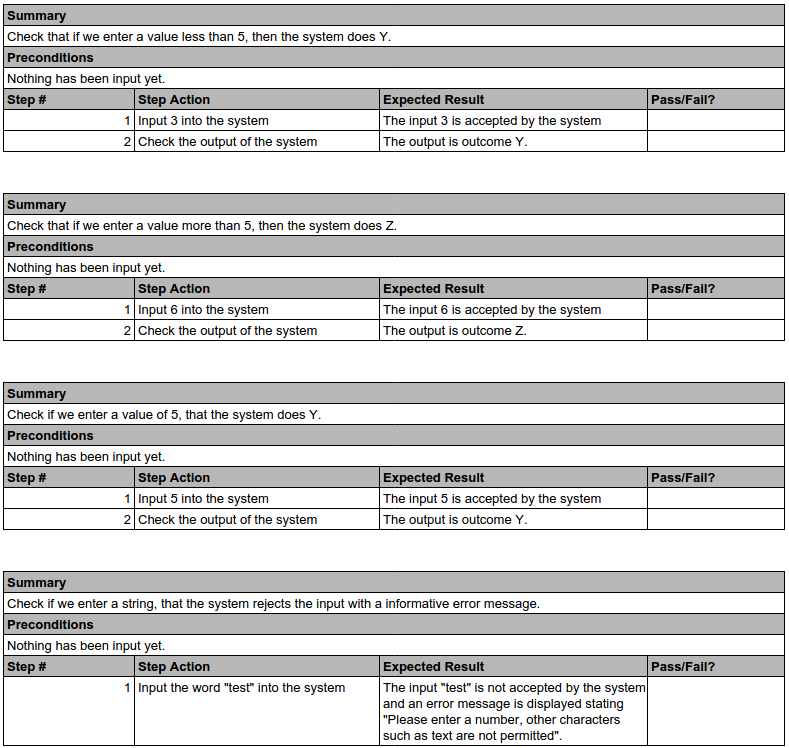
Now, given a very simple piece of software that takes in value X, determines if X > 5 and then does Y or Z depending on this, we might write some test cases for this that look like this:
testCases.png

This is a very simplistic example, but take note of how much I’ve had to write here to fit this format and how long it takes you to read it. Maybe it takes me a few minutes to write these sections, fix any spelling mistakes and review it to make sure it makes sense.

Now, consider if I documented the same example as a diagram:

decisionTree.png
How long did it take me to draw this? About 30 seconds in a decent flowchart program (such as yEd). I had fewer errors to correct and this particular example mapped very easily into a flowchart. How long did it take you to understand this diagram? How long did it take you to read the test cases? Which was most effective at helping you understand the behaviour? How long would it take you to think of some test ideas?

Hang on, where can I document my tests?

So we’ve not satisfied the desire for some documentation of our tests here. This diagram only satisfies the need for an explanation of the system. Test cases outline specific tests we may want to run. So, maybe we still need test cases and we just need a few diagrams to help explain more complex areas? Is there any other solution?

Enter...mind maps

So I did a little digging and looking around, I felt that surely there are better ways to design tests. Test cases can feel very slow to write, slow to read and hard to keep written in a particular format. This is when I came across mind maps described in this blog by Darren McMillan.  A mind map is not too different from a brainstorm - simply start with a topic and begin branching ideas from it. Taking my example above, I might end up with this mind map (created in a great tool called XMind found here):
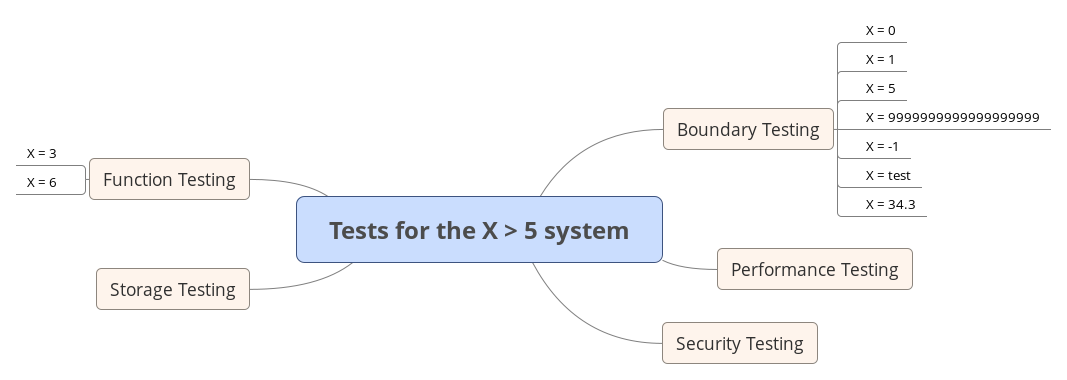
testCases2.png
Here I’ve explored some test ideas and started to design my tests. Exploring these ideas may raise questions that I don’t know the answer to right now - is storage a concern? If it is, how does it get stored, maybe security is a concern if the underlying system is using a MySQL database, maybe I need to test for SQL injection? Maybe performance needs to be considered? I can also show this to other people and they can quickly understand the scope of my testing without having to read individual test cases - and I can quickly observe the scope of my own testing and keep adding to it. It’s much easier to consider the overall picture of my test plan using this diagram.

But isn’t it difficult to draw diagrams and fit things in?

Yes, I don’t think mind maps are a replacement for test cases. Instead, I think this is a tool that can be used in conjunction with test cases to help you design and document tests in a more readable format, quicker. However, there are still cases where it can be difficult or time-consuming to create a mind map or diagram. I envisage that you may start with a flowchart and formal documentation of a system first, to understand the system you are testing. You would then create a mind map to explore what you want to test around this system. Finally, you would perhaps write test cases to formally document your tests, especially where they have complex steps.

So are there any quick, easy solutions to design and document all tests?

No, I don’t think so. I think by the nature of having to design, write or draw tests, they can never be created in zero time. Some systems or tests will be complex and you cannot run away from the complexity - drawing a diagram or writing test cases may be a way of reducing or making the complexity easier to understand, but sometimes it’s not possible to simplify it.
In the process of thinking about and writing this blog post, I think I’ve come to the conclusion that the problem here is not that we don’t need test cases. The problem is that we are not always using the right tool for the job and sometimes as testers we aren’t thinking carefully about the format we want to write or convey our tests and documentation. Using flowcharts and mind maps allow us more tools for this purpose, and they definitely are not the only forms of diagram or documentation we can use!

But what if I want to collate my tests and re-visit them for regression?

I think this is the crux of why test cases become relied upon so much. Why is it useful to re-visit test cases? Is it because you don’t want to miss an important test that you might have forgotten? I would argue that if we are repeating an important test regularly, we’re unlikely to forget it and simply because it is in a test case format doesn’t mean its importance is always highlighted - which means you’re either regularly running a lot of test cases “just in case” or potentially missing these tests anyway.
Wouldn’t it be better to document a system in a way that conveys information - highlighting important areas, rather than trying to fit all such information in a test case format?

That nagging feeling…

I still feel dissatisfied with my conclusions, I still have concerns that test cases and diagrams still require a lot of skill to write or draw in a way that is easily understandable by others. Every one of us will write or draw things differently and this makes it difficult to be consistent. The need to set standards, train people and conduct reviews still feels like it’s necessary.
However, I definitely do feel that in my career so far as a tester and in my conversations with other testers, there has definitely been too large a reliance on writing test cases over other forms and styles of documentation. I do believe that as testers we can definitely save some time and improve the quality of our testing by considering other techniques and not relying on test cases.
But I still feel there could be a better way!

Summary


  • Test cases are not always the most appropriate format to document tests.
  • Diagrams like flowcharts can be used to document and explain systems better than a test case. Rather than using test cases to learn a system, we could use diagrams or more formal documentation of the system - if this documentation doesn’t exist already, it’s worth creating it!
  • Mind maps can be used to assist in designing and documenting tests, rather than designing the tests as you write test cases. Mind maps provide better visibility of your overall test plan.
  • Writing test cases or drawing diagrams still requires skill - diagrams are not necessarily better than test cases all of the time and not necessarily easier to create to a consistent standard.

Monday, 9 November 2015

Automation in testing - writing your own tools

Introduction

A consistently hot topic in testing is “automation” and how it can be used to improve testing. In this blog post I’m going to talk about how you can really get the most out of “automation” very quickly.

Automation? So you’re going to replace me with a machine?

Nope, I’m going to suggest you augment your abilities as a tester like a cyborg! Part human, part machine. Frequently people assume automation is referring to having a machine perform all of the tests you might perform manually. But actually automation can be used to help you manually test faster. Are you spending a lot of time tearing down databases and re-creating data? Are you spending a lot of time repetitively reading and comparing files? Automation can help you focus on the fun part of testing!

So where do I start?

Before I get onto some of the ideas for what you can automate, you need tools in order to create the automation! First of all, do you have any programming knowledge? If you don’t, don’t fret! (if you do, please ignore me as I’m writing this assuming you don’t). There are things called “scripting languages” - these are a form of programming language that is usually interpreted rather than compiled. What does that mean? Well it means they are much easier to work with and some of them even have more natural english language-like syntax. These scripting languages are a great way to quickly and easily put together programs that automate tasks for you and hopefully you will find them much more accessible than compiled programming languages such as Java or C.

So which language is best?

The one you are most comfortable with really, if you already know a language, then there is nothing wrong sticking with that language. If you don’t know any languages, then some I would recommend are Python and Ruby. I personally prefer Python and I will write the rest of this blog on Python but Ruby is equally good place to start.
Check them both out and decide for yourself which you like the most:
The reason I recommend Python and Ruby is because they are very commonly used and can be run on any machine be it Windows, Mac or Linux. There are lots of examples of free code or libraries (collections of code) available online for you to use to tackle almost any problem too. I personally prefer Python simply because it is more human-readable than Ruby and many other languages.

Ok, so I’ve done a few tutorials but what do I start automating?

Think about tests you’re running and where you spend the most time, can any of it be handled by a script? Is there something about the setup of the test that can be automated?

I don’t know?

That’s ok, it is hard at first to really know what you can and can’t do until you’ve attempted something or seen it done before. Naturally I would recommend trying some ideas as this is always a good way to learn. But to give you some ideas of what is possible, I’ll cover some of the tools that I’ve created myself.

Data Setup

My first port of call whenever I’m considering automation-assisted testing is to look at the data setup for the test. Sometimes there can be a lot of tests that require a lot of setup before hand but you don’t want to vary that setup too much, you simply want to have an environment where you can focus on a particular area. Perhaps you’re attempting to recreate a bug 20 pages into a website or an application. Or perhaps you’re testing an invoicing system and you simply want some base data to repeatedly test against. Sometimes these kinds of tests involve a lot setting up and then restarting to try something else - you want a “clean” set of data that isn’t spoiled too much by testing you’ve done before.

Automation can help a lot in quickly setting the exact same “clean” data up again. You may ask “but why not just have a saved state of an environment?” - sure, that is a valid alternative strategy to deal with this problem. However, it’s a different kind of maintenance - with that you are maintaining a database that you need to keep updating. With a script you may also need to keep updating with changes to the system you are testing. Personally I prefer maintaining scripts, I feel you can more easily create scripts that are less affected by change than keeping a database in a clean state.

Some examples of tools I’ve created to help speed my testing up by creating data are:
  • A script that utilises the Selenium Webdriver library to open a browser window and create data in a web application for me. I wouldn’t normally recommend using Selenium for data setup because it is designed for checking UI elements and is therefore quite slow. But in this particular case this was a legacy system with no alternative than a UI for creating the data. I felt it was worth mentioning because Selenium is a useful library if you need to script around a UI. This script became a time-saver simply because it could be left running while I worked on other things.
  • A script that controlled two SIP telephones and had one call the other using the sipcmd program and later, the PJSIP library. This was used to quickly and easily create call traffic, especially in large amounts (e.g. making 100 calls). During some of my testing I’ve had instances where I’ve had to simulate telephone calls and it was useful to automate it to create volume. It also had the benefit of being able to then log and provide details about the phone call that would have been more difficult to see manually.
  • A script that uses the requests library to interact with a REST API. This allowed very rapid data setup within seconds and the requests library is extremely straightforward to use. I fully recommend this approach to data setup because of its speed.

Speeding up tests

The second area I focus on is to look at where I spend the most time during a test. Am I manually performing something that is just checking? Can a machine do this checking instead? I once had to test a change to a billing system that produced invoices for customers. I wanted to run the invoices on the old system and the new system and compare them to see if I could quickly identify any obvious problems between the two. Manually, this was a lot of “checking” that didn’t really require much intellectual thought - I would be literally comparing one value to another. This is a candidate for automation, so I can focus on more intellectual tests such as focusing on edge cases or perhaps scenarios where we don’t currently have a customer (so I can’t test through this method).

Some examples of tools I’ve created for speeding up tests are:
  • A script that compares groups of CSV (comma-separated values) files. I used this to very quickly compare the results of running invoices in one version of a billing system with another. It very simply compared the totals of the invoices - so it wasn’t “testing” very much, but it allowed me to very quickly identify any easy or obvious failures in the billing if the totals didn’t match. This is a good example of a script that augmented my manual testing and allowed me to provide information much faster.
  • A script that uses the requests library to quickly check every customer-facing API endpoint returns a 200 OK response. This was useful for very quickly performing a very basic check that the API appeared to be functioning - which would quickly catch any easy bugs.

When not to automate

So this all sounds great right? Remove all the boring, time-consuming testing and leave a machine to do it? Hold your horses! It’s not quite as straight-forward as that. There are times when automation really isn’t a good idea. Here are some common pitfalls for automation:
  • The desire for invention. Beware of becoming more interested in engineering automation than providing valuable testing. Make sure that any automation you are writing is going to deliver some value to your testing. Don’t simply automate parts of your testing simply because you can.
  • Avoid creating a mirror image of the system you’re testing. This is very easy to do, say you are testing a calculator - it’s easy to end up writing a script that enters 2+2 and then calculates the answer itself. So both the calculator and the script calculate the answer is 4. Why is this bad? Because in a more complex example where a failure occurs, how do you know which is wrong? Have you written a script that calculates the answer wrong or is the calculator failing? Instead you should be writing a script that already knows the answer. You shouldn’t be calculating the answer during the test.
  • Once-only tests with little to no repetitive nature to them. When I say repetitive nature, I mean there isn’t anything in this one-off test that requires you to repeat something like data setup or checks - these are obviously good to automate potentially. But otherwise one-off tests are nearly always quicker to perform manually and the cost of creating your automation script won’t be recovered in value because it may never be used again.

One more thing…

This post has been all about creating your own tools via scripting, but sometimes a tool may already exist! It's always worth searching around the Internet for existing tools that may help your testing, but learning scripting is useful in situations where you don’t have time to search and try different options and just want to quickly script something small.
Existing tools can take many forms such as Python libraries, professional software products or perhaps plugins or extensions to another piece of software your company already uses.

Summary

  • Automation is useful to augment your testing, improving your speed and efficiency.
  • Scripting languages are a good place to start learning how to create your own automation tools.
  • It’s hard to know what you can script at first, so never stop asking the question “can I script this?”.
  • However, beware of creating automation simply because you can, make sure it’s valuable.
  • Even if you can’t create your own tool, have a look around and see if anyone else has.